Author: admin

  • Articol de test editat

    Reel Vs Story: Which Format Should You Use?

    Updated June 2026.

    When you’re deciding between a reel and a story, the simplest rule is this: use a reel for discovery, use a story for interaction, and use both when one idea needs reach and response. That choice matters because the wrong format can bury a strong idea, while the right one can give the same content a much stronger result.

    If you’re planning social media content for a brand, the format is part of the strategy, not just the wrapper. A feed post, a story, and a reel each do a different job, so the best choice depends on the outcome you want. If you need a broader planning lens, social media content and social media strategy both start with the same question: what should the audience do next?

    In this guide, I’ll break down the difference between a reel and a story in plain English, show where each format performs best, and give you a fast way to choose the right one without overthinking it. If you’ve ever asked yourself, “Should this live as an Instagram reel or story?” this is the decision framework you need.

    Reels Vs Stories On Instagram: Main Differences

    Use reels when the goal is discovery, and use stories when the goal is a conversation. Reels are built for broader reach and longer shelf life, while stories are built for faster, follower-first interaction.

    That split is the easiest way to think about instagram marketing. Reels are the format you want when a piece of content can keep working after publication. Stories are the format you want when the message has a short window, needs a response, or should feel more immediate.

    Instagram Story

    A story is the better choice when the job is to speak directly to people who already follow you. Stories are temporary, interactive, and ideal for updates that should feel current rather than polished.

    According to Instagram Help Center, stories disappear after 24 hours unless saved to highlights, and video stories can run up to 60 seconds per clip. That makes stories a strong fit for announcements, quick feedback loops, limited-time offers, and behind-the-scenes moments that do not need a permanent home.

    Stories also favor action over passive viewing. Use them when you want replies, taps, votes, or link clicks. The current story toolkit includes:

    • Poll stickers for quick opinion checks.
    • Question stickers for open-ended feedback.
    • Emoji sliders for lightweight reactions.
    • Link stickers for traffic and conversions.
    • Quiz stickers for simple engagement.
    • Music, text, and GIFs for faster, more casual communication.

    Instagram Reel

    A reel is the better choice when the job is to reach beyond your current audience. Reels are discoverable, evergreen, and better suited to content that can keep earning views after the first day.

    Instagram now allows reels up to 3 minutes long, which gives brands more room than the old short-form limit. In practice, though, shorter reels still need a tight hook and a clear point. Reels are strongest for educational content, product demos, trend participation, and any message that benefits from being replayed, saved, or shared.

    If you want the most current guidance on format mechanics, instagram reels should be treated as a discovery format first and a video container second. The strongest reels usually combine a fast opening, a single takeaway, subtitles, and a clear visual payoff.

    Quick Comparison Table

    Factor Reel Story
    Lifespan Lasts beyond the first day and can keep circulating Disappears after 24 hours unless saved
    Main Audience New people and existing followers Existing followers, or a close audience
    Best When Discovery, education, and evergreen value matter Urgency, response, and relationship building matter
    Engagement Style Likes, comments, shares, saves Replies, taps, stickers, and link clicks
    Discoverability Higher, because of Explore and reel surfaces Lower, unless saved, reshared, or highlighted
    Best Use Case Tutorials, trends, product stories, and brand reach Updates, polls, offers, and behind-the-scenes content

    If you are choosing between a reel and a story in one sentence, the answer is simple: choose the format that matches the audience behavior you want to trigger.

    Which Format Gets More Views And Engagement?

    Reels usually win on reach, while stories usually win on depth of interaction. That does not make stories weaker; it just means stories and reels are serving different jobs.

    The benchmark data supports that split. Socialinsider’s live Instagram data shows an average engagement rate of 4.93 percent across posts since January 2025. Socialinsider’s reel benchmarks also show that engagement rate changes by audience size, with 0.87 percent for accounts under 5k followers, 0.50 percent for 50k to 100k, and 0.45 percent for 100k to 1M. For stories, Socialinsider’s guidance puts 5 to 10 percent follower reach in the reasonable range, with 15 percent plus considered strong.
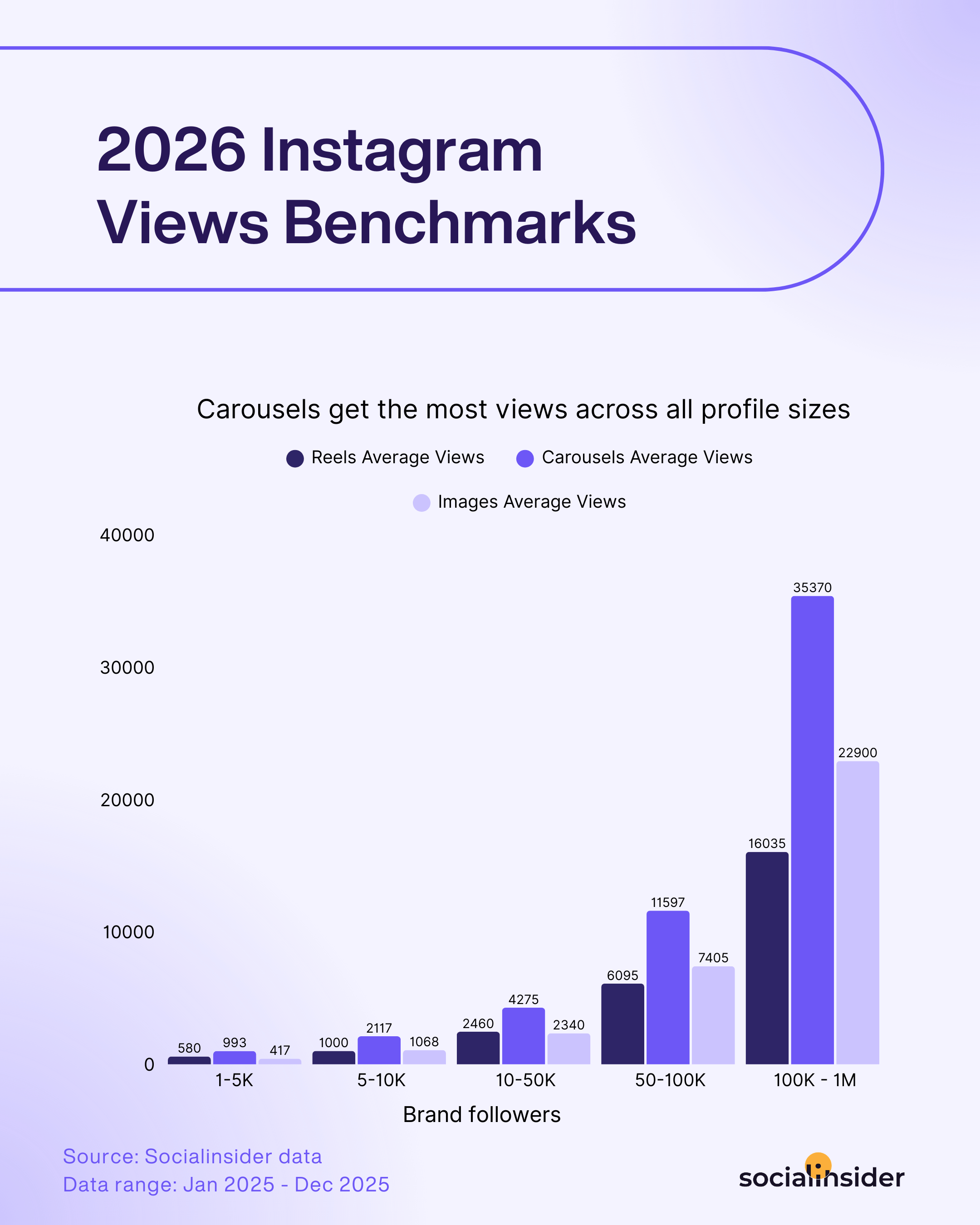
    instagram views benchmarks

    That gives you a practical rule: reels are better for getting discovered, and stories are better for starting a response among people who already know you. A reel can help a new audience find the brand. A story can help a warm audience move from passive viewing to tapping, replying, or clicking.

    Adam Mosseri framed the reel side of that equation clearly: “We’ve heard a lot of feedback from a lot of you creators out there that 90 seconds is just too short. So we’re hoping that upping that limit up to three minutes will help you tell the stories that you really want to tell,” said Adam Mosseri, Head of Instagram. The message is simple: reels are now spacious enough for better storytelling, but they still work best when the content is built for discovery.

    If you want to benchmark your own mix more precisely, social media analytics tools can show whether views, saves, replies, or exits are moving in the right direction. That matters because a high-view reel and a high-response story can both be wins, just in different ways.

    When To Choose A Reel

    Use a reel when the content should travel beyond your current followers. Reels are the format for discovery, and the strongest brands use them when they want a message to have a second life after publication.

    Build Brand Visibility

    Use reels for visibility when brand awareness matters more than immediate conversation. Reels are the best choice when you want new people to see your brand, remember your name, or find your account through non-follower surfaces.

    A Morgan Stanley survey, reported by Business Insider, found that 74 percent of Instagram users use Reels. That is a useful signal for teams deciding where top-of-funnel content belongs. If the audience is already spending time in the reel experience, a brand has a better chance of entering the discovery flow.
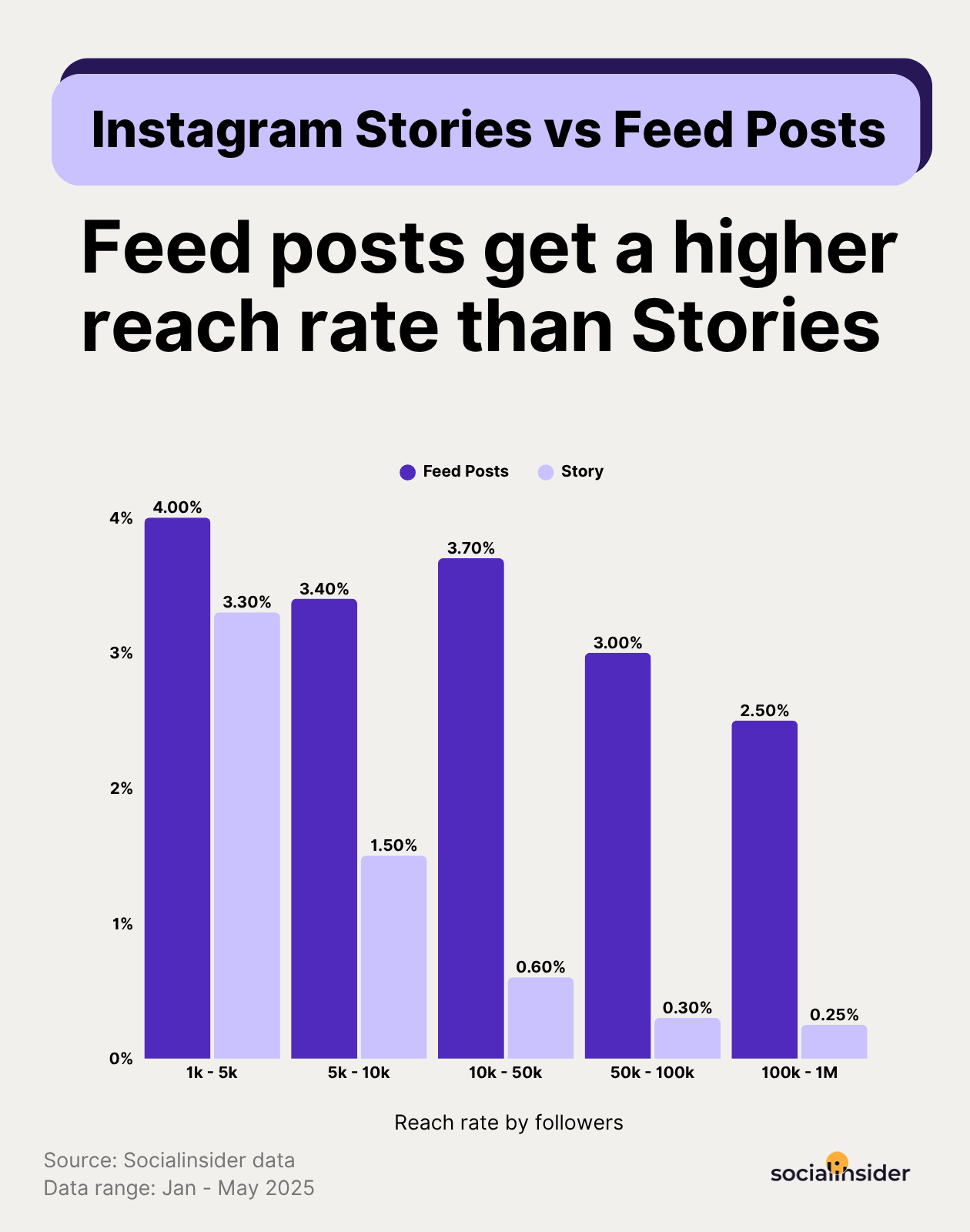
    instagram stories vs feed reach

    Use reels for:

    • Brand introductions.
    • Product teasers.
    • Thought leadership clips.
    • Customer proof.
    • Simple educational content that can stand alone.

    Tap Into Trends

    Use reels for trends when the trend can amplify the brand message instead of distracting from it. Reels are the fastest way to join a conversation that is already moving.

    According to Socialinsider’s Reels guidance, the best-performing reel lengths sit around 60 to 90 seconds, but trend-driven reels often need to be much shorter to land quickly. That means the hook matters even more when the idea is tied to trending audio, a popular format, or a timely cultural moment.
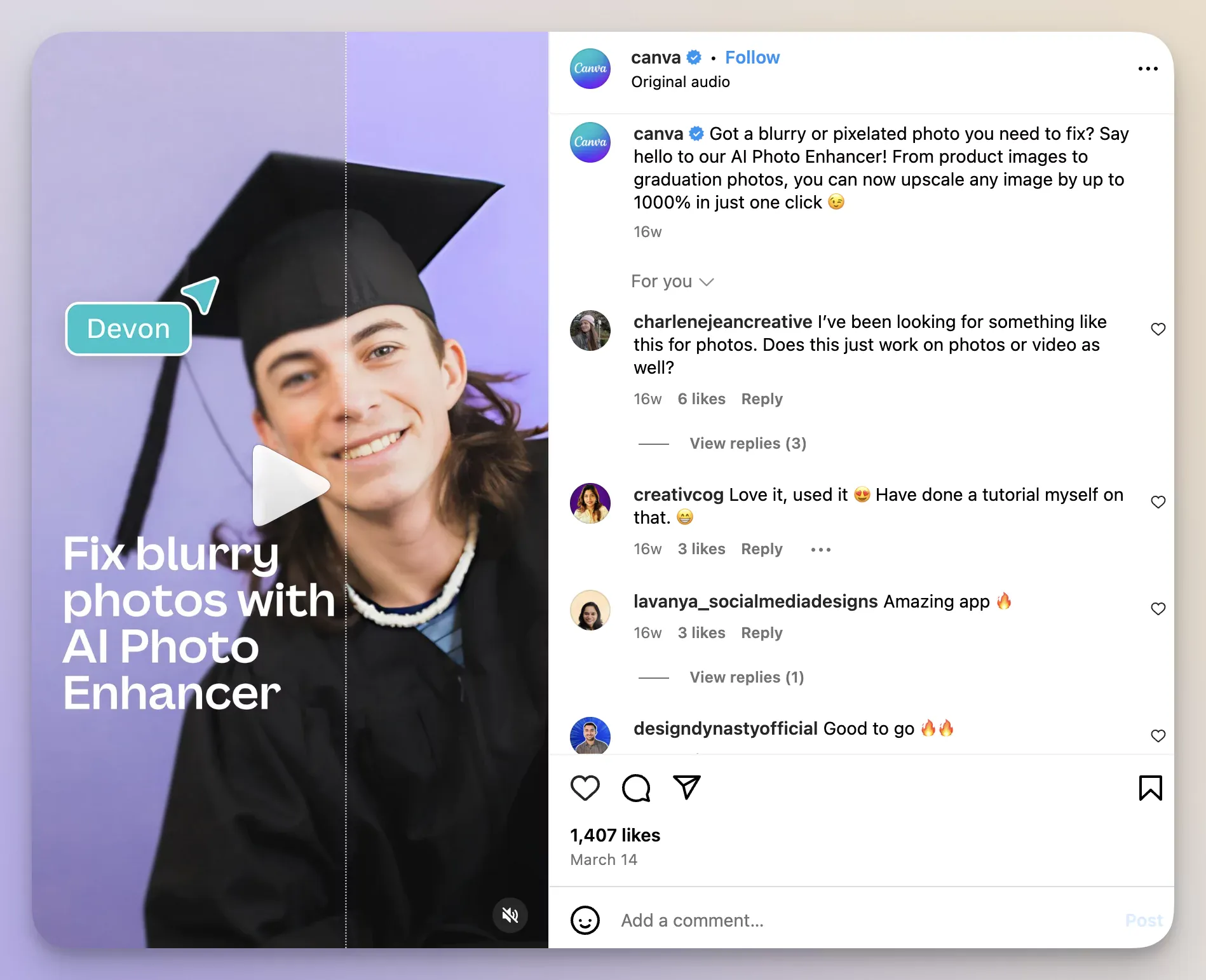
    example of hooks usage in reels

    Try this structure:

    1. Lead with the trend in the first second.
    2. Connect the trend to a real audience problem.
    3. Keep the message tight.
    4. Add subtitles so the point lands without sound.
    5. Use trending audio only when the sound supports the story.

    Create Educational Content

    Use reels for education when the lesson should stay useful after the day it is posted. Reels are especially strong for tutorials, quick explainers, product walkthroughs, and “how it works” content.
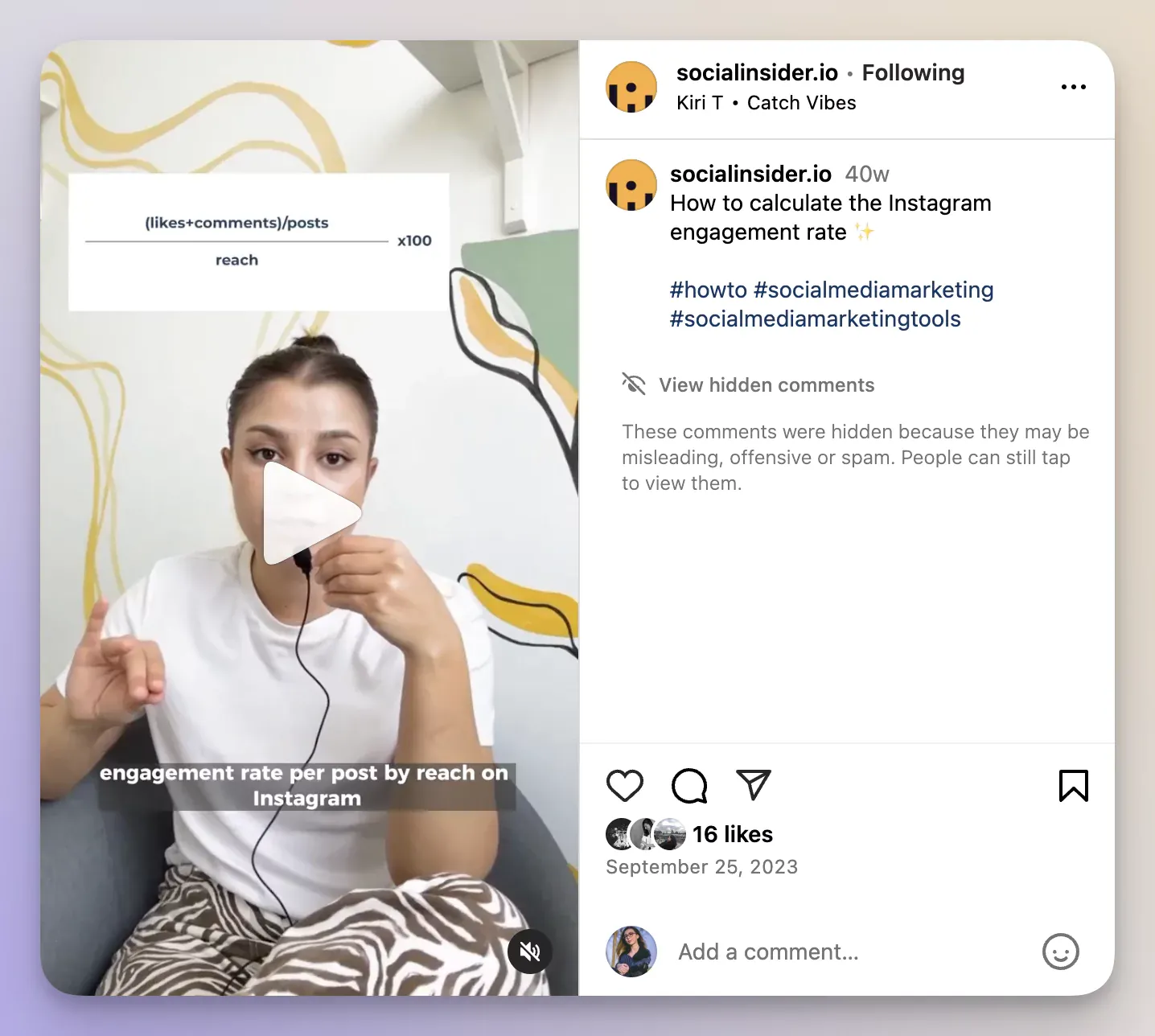
    educational content on instagram reels

    Educational reels work because they combine clarity and replay value. Someone may save the video today, watch it again next week, and share it with a teammate later. That gives the format a longer tail than a story, which is exactly why educational content belongs in reels when the topic has lasting value.

    A good test is simple: if the audience will still need the information next month, make a reel. If the information will feel stale tomorrow, make a story.

    Showcase Brand Personality

    Use reels for personality when the brand voice deserves a bigger stage than a quick update. Reels are ideal for showing how a team thinks, what a brand stands for, or what makes the company feel human.
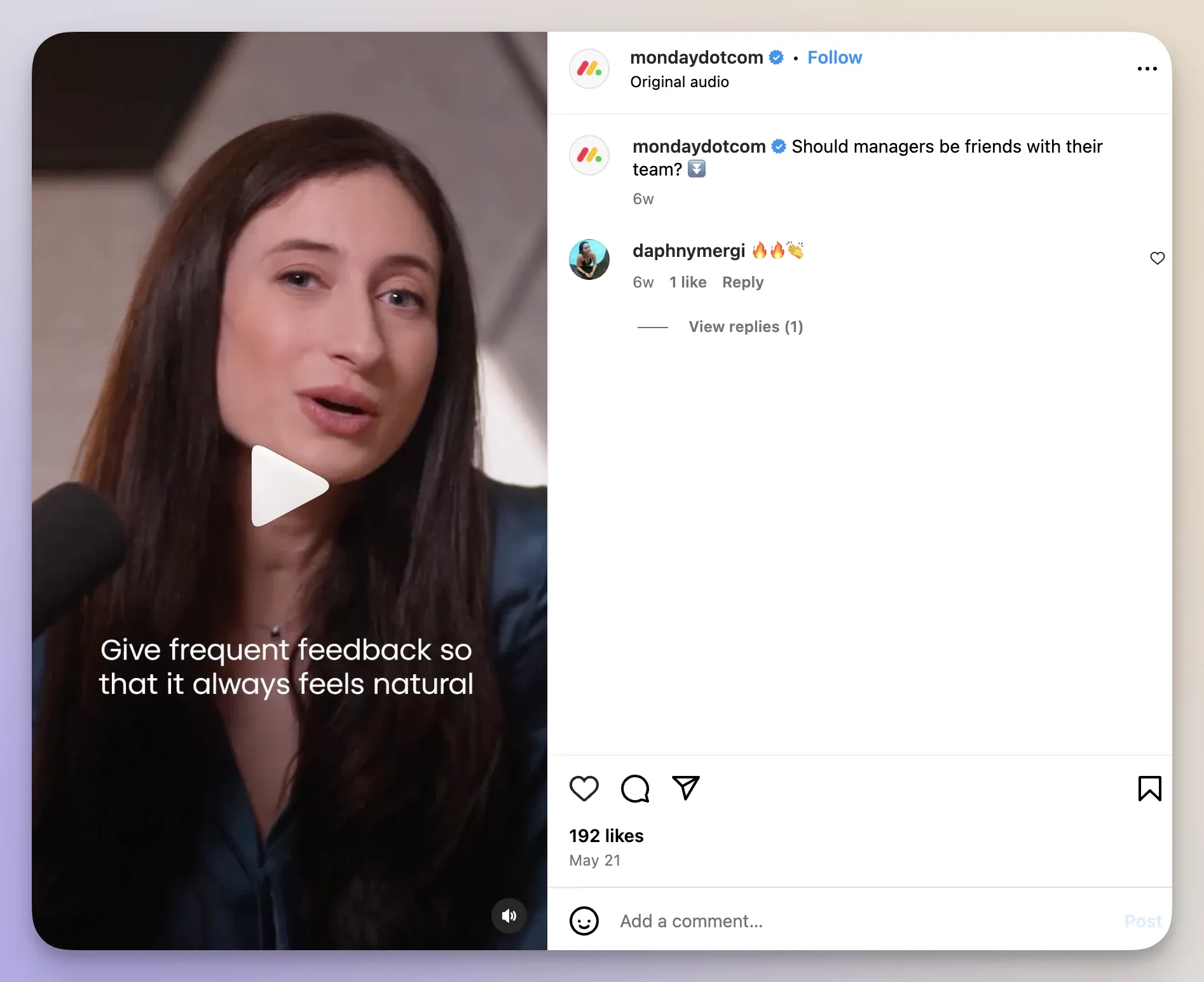
    brand values reel example

    This is where a brand can turn values into something visible. A mission statement is abstract. A reel can show the people, process, and decisions behind it. That is why reels often outperform static content when the goal is to make the brand feel memorable, not just informative.

    A strong reel here usually has one clear point:

    • The culture the team wants to signal.
    • The problem the brand solves.
    • The perspective that makes the company different.

    Present Products Or Services

    Use reels for products or services when the audience needs to see the value, not just read about it. Reels are the best format for demos, use cases, and before-and-after proof.

    example of hooks usage in reels

    That is where video marketing strategy matters. A reel can show a workflow, a feature, or a result in motion, which often makes the benefit easier to understand than a caption or a static graphic. For brands with complex offerings, a short demo reel can do more work than a long explanatory caption.

    Keep the structure simple:

    • Show the problem.
    • Show the product in use.
    • Show the outcome.
    • End with one action.

    Highlight Influencer Partnerships

    Use reels for partnerships when social proof is part of the message. Reels make creator collaborations feel more native, more visible, and more shareable than a quick story mention.
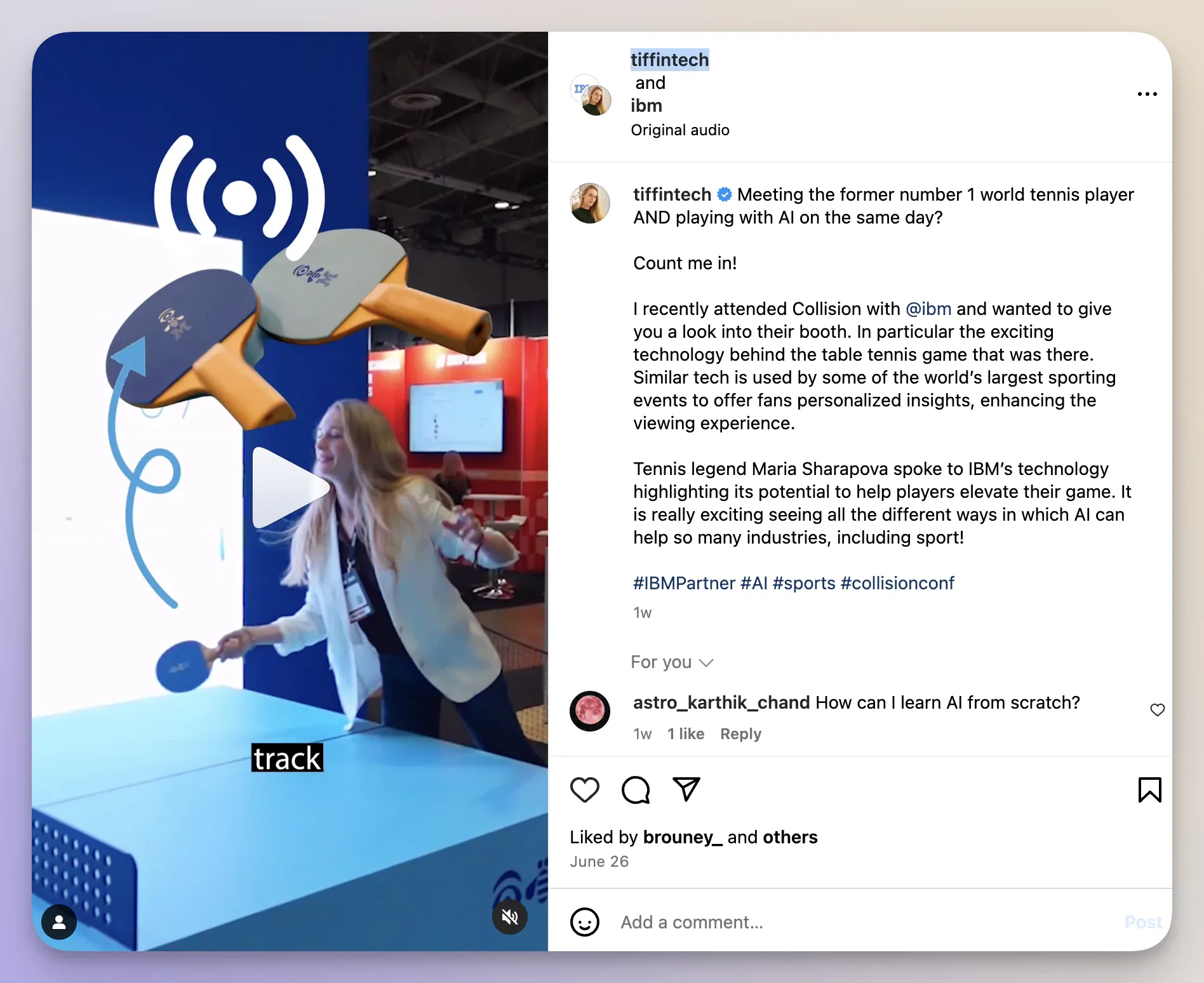
    partnerships reel example

    A reel is especially useful when the creator can demonstrate a product in their own style. That combination tends to outperform a heavily scripted brand post because the audience sees a real voice, not just a branded endorsement. If the partnership is meant to build trust and reach, reels usually do that job better than stories.

    Pro Tips For Great Performing Reels

    Use a reel when the content can hold attention for more than a few seconds and still feel useful later. The best reels are not just short; they are intentional.

    A few practical rules help:

    • Keep the first line or frame clear.
    • Use subtitles for silent viewing.
    • Make one point per reel.
    • Test a 60 to 90 second version before stretching longer.
    • Keep the visual pace moving.

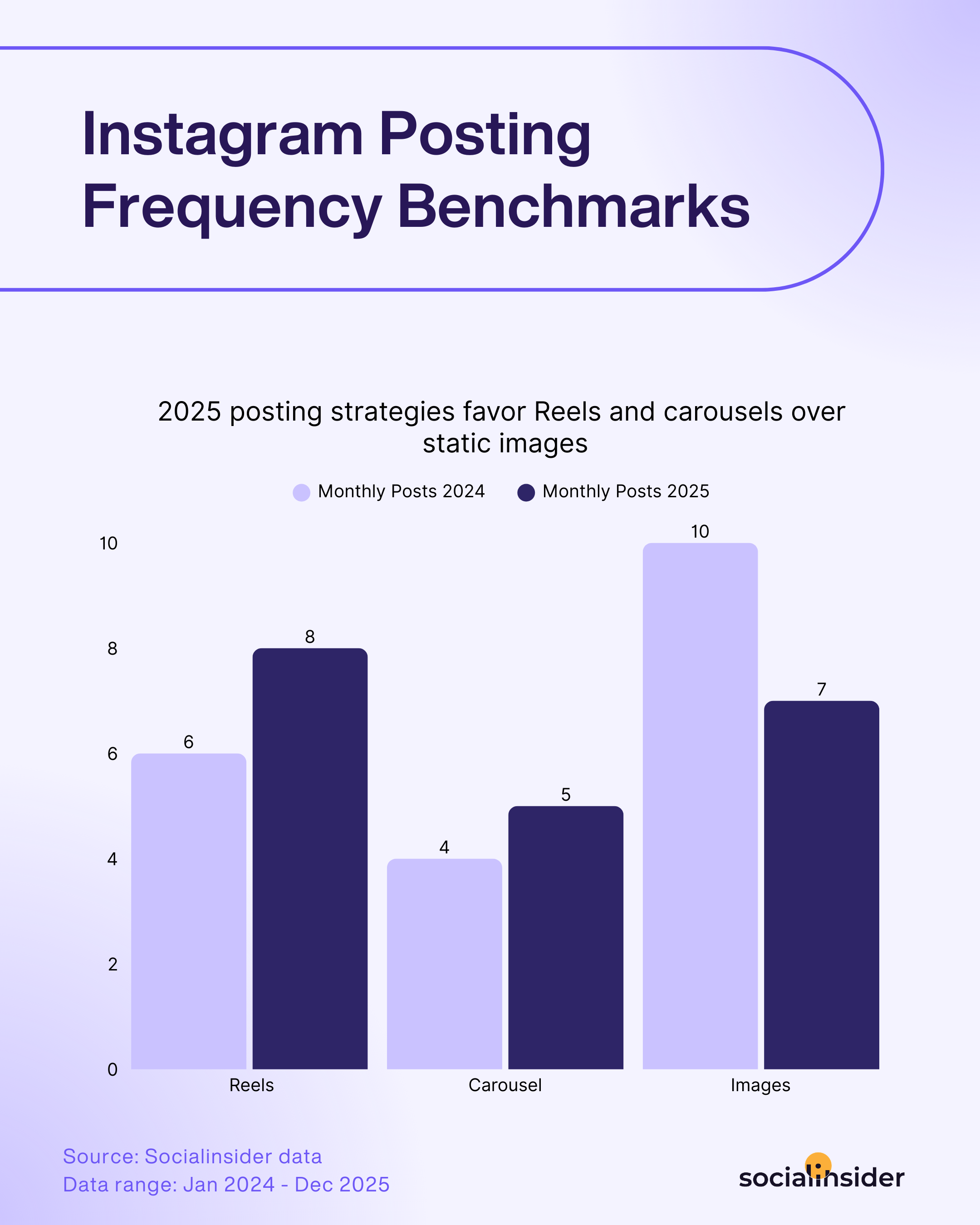
    instagram posting frequency benchmarks

    Consistency matters too. The exact cadence depends on team size and content capacity, but the bigger lesson from posting frequency benchmarks is that quality and repetition need to balance each other. A reel that works once is helpful. A repeatable reel format is better.

    When To Choose A Story

    Use a story when the message needs to feel immediate, interactive, and close to the audience. Stories are the format for quick feedback, time-sensitive offers, and behind-the-scenes communication.

    Stories are also the better choice when you want to speak with followers, not at them. Because stories disappear after 24 hours, the format naturally creates urgency and a lighter expectation of polish.

    Get Audience Feedback

    Use stories for feedback when the goal is to learn fast. Stories make it easy for followers to respond without a lot of friction, which is why they are so useful for testing ideas, collecting opinions, and gathering quick sentiment.
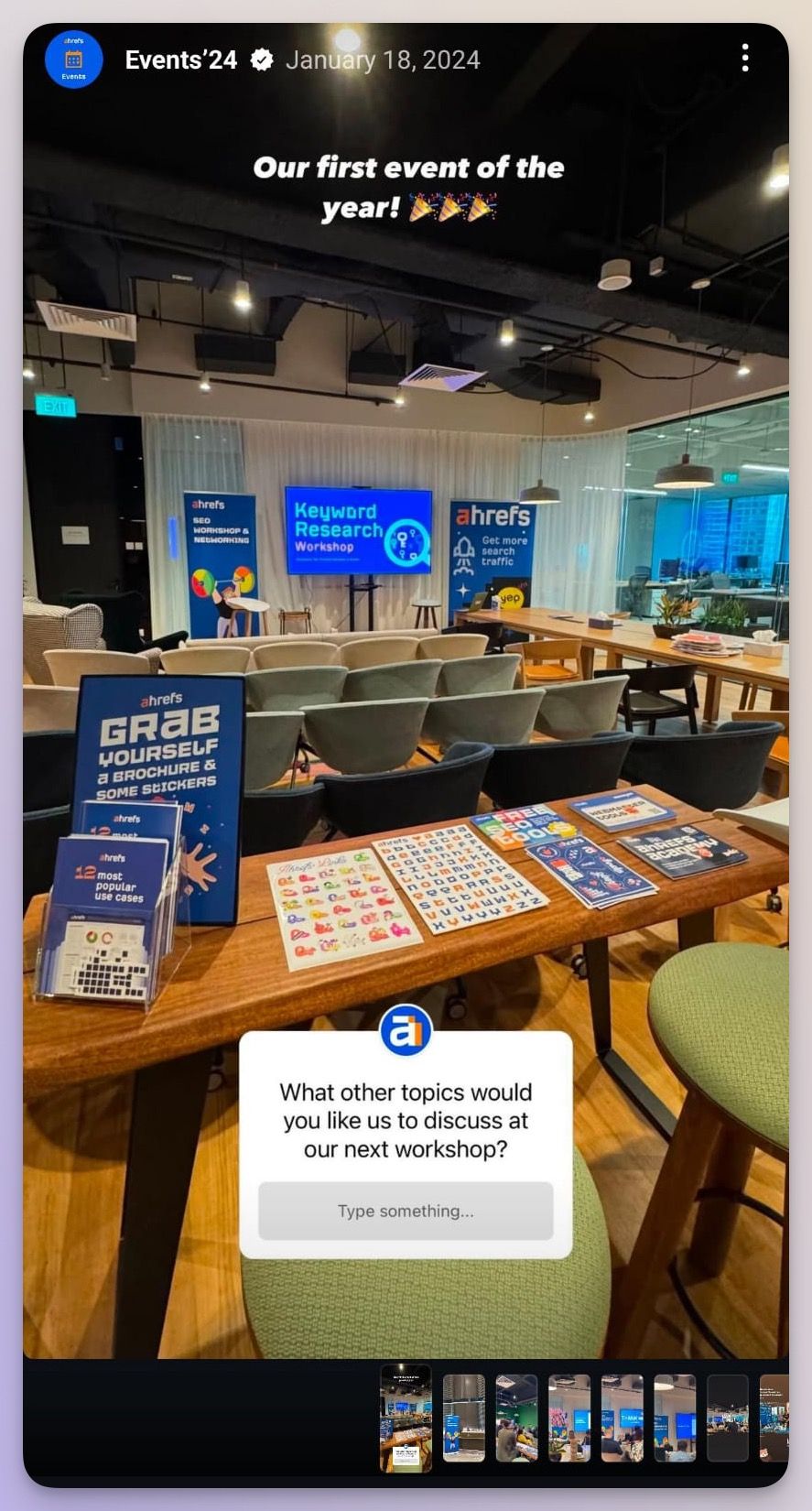
    ahrefs story in instagram example

    If your team is choosing between two headlines, two product concepts, or two creative directions, a story poll can give you a directional answer in hours instead of days. That is especially useful when social media goals include audience research, product input, or community-building.

    Use stories for:

    • Polls.
    • Question stickers.
    • Emoji sliders.
    • Short reaction prompts.
    • Link stickers tied to follow-up action.

    Post Time-Sensitive Offers

    Use stories for time-sensitive offers because the format matches the urgency of the message. A story works best when the audience should act today, not eventually.

    Instagram Help Center confirms that stories last 24 hours, which makes them a natural home for flash sales, live event reminders, limited drops, and deadline-driven traffic. The current CTA should be a link sticker, not a swipe up, so the path to action stays simple.
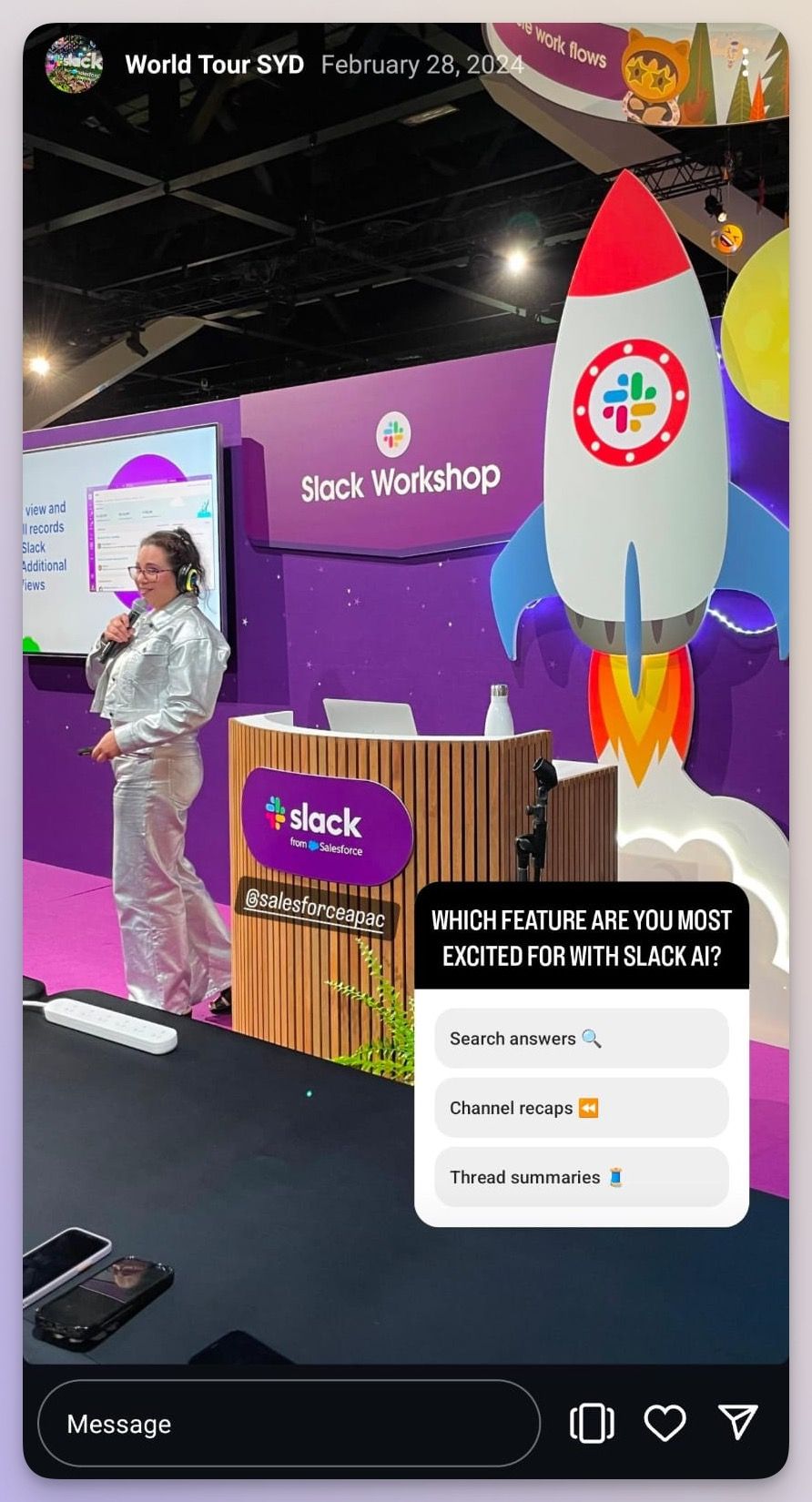
    instagram story with poll example

    Stories also work well for resharing user-generated content, live updates, or a quick reminder that a launch is still open. If the content needs a short shelf life and a fast decision, stories are the right format.

    Feature Behind-The-Scenes Content

    Use stories for behind-the-scenes content when the goal is to feel real, not polished. Stories are the right place for raw moments, team snapshots, and process updates that would feel too casual for the feed.

    A story can show the work behind a launch, a conference setup, a team brainstorm, or a quick milestone celebration. That makes the brand feel accessible without forcing the content into a long-form video structure.

    The beauty of this format is that the content can be imperfect and still effective. In fact, a little roughness often helps the story feel more trustworthy because the audience is seeing the brand in motion, not in a polished campaign frame.

    Pro Tips For Great Performing Stories

    Use stories when audience response matters more than broad discovery. The best-performing stories are short, clear, and easy to tap through.
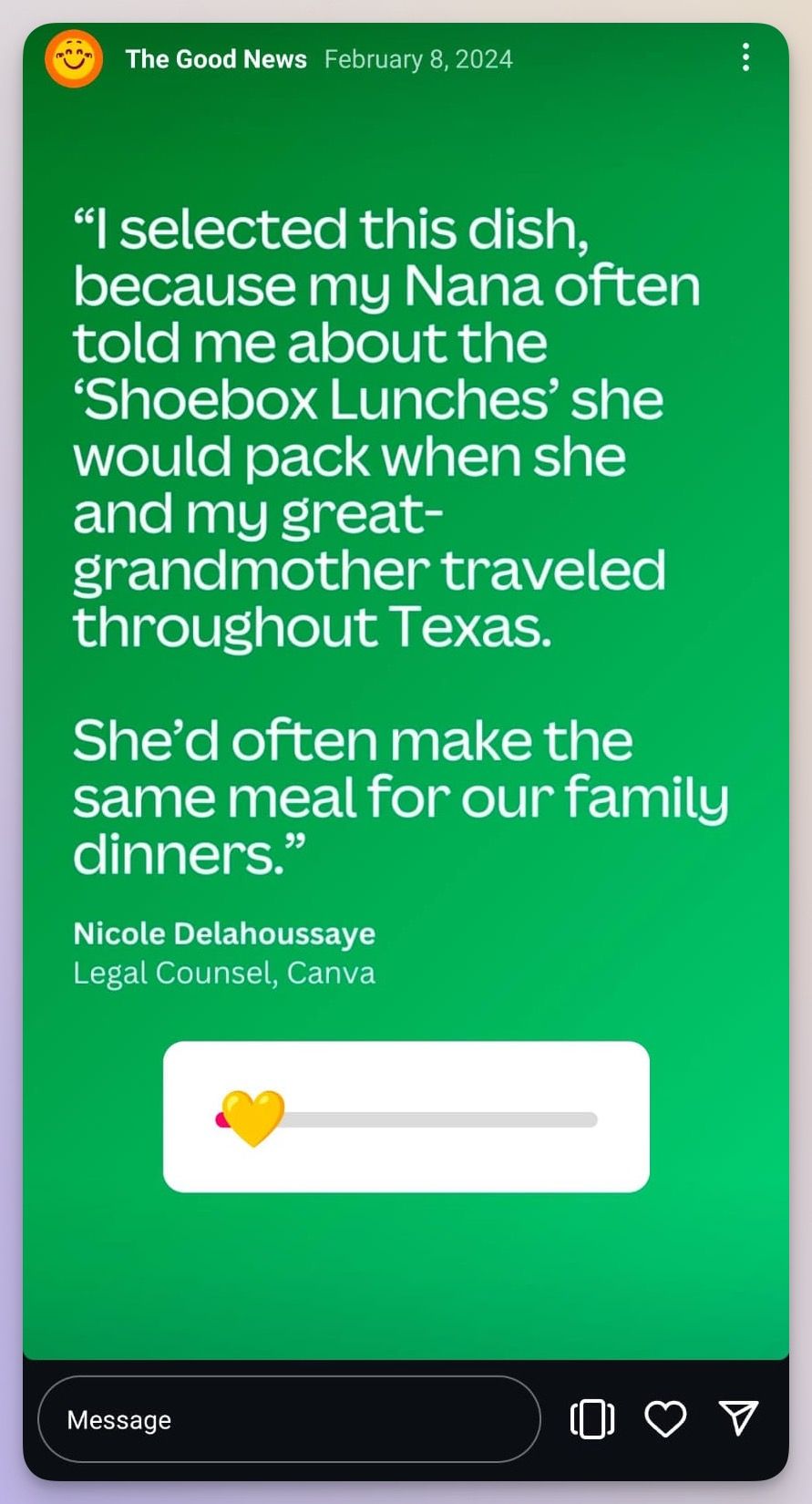
    instagram story with emoji slider example

    A few rules help stories perform better:

    • Keep the message focused.
    • Use one sticker per frame when possible.
    • Avoid overcrowded layouts.
    • Put text where the interface will not cover it.
    • Save strong stories to highlights when the message deserves longer life.
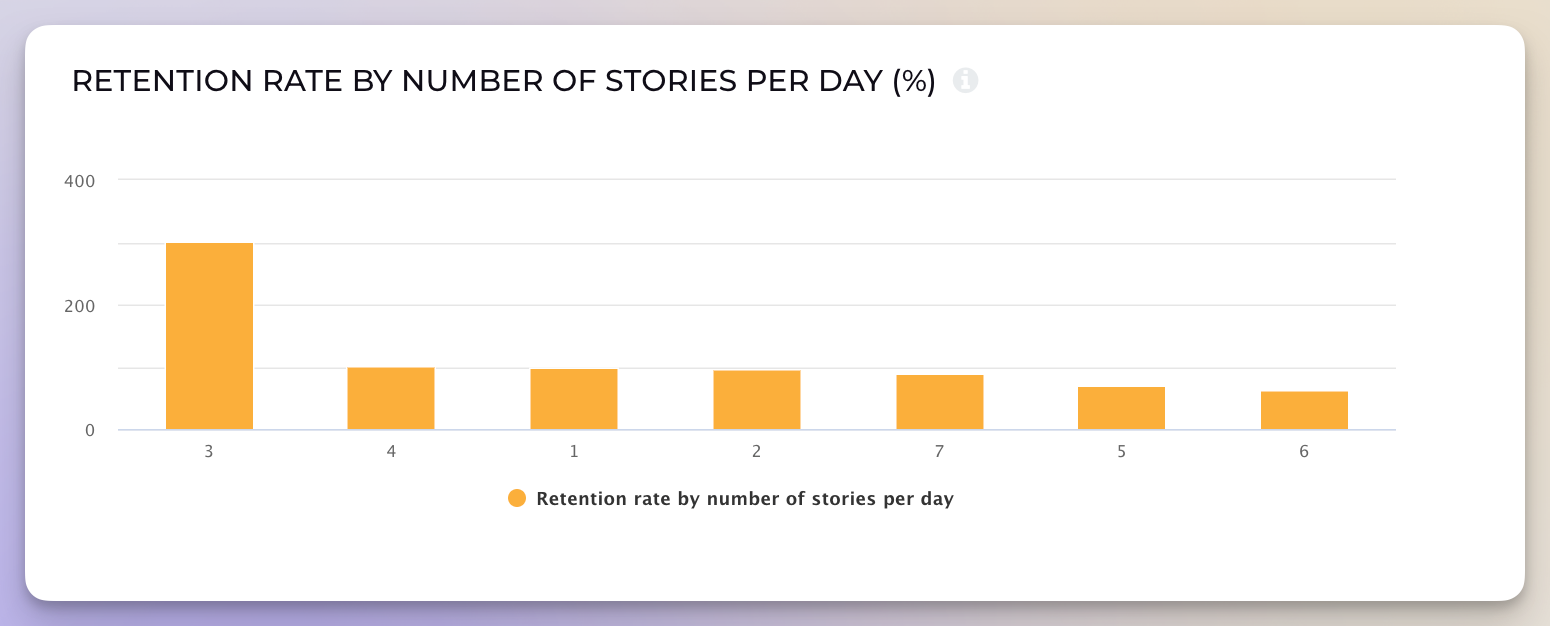
    instagram story retention rate

    Socialinsider’s story guidance suggests that reaching 5 to 10 percent of followers is a reasonable baseline, while 15 percent plus is strong. That makes story retention worth watching closely. If viewers drop off fast, the story may be too long, too dense, or too repetitive. If completion holds, the message is probably aligned with audience interest.

    How To Combine Reels And Stories

    Use reels and stories together when one idea needs both reach and response. Reels can introduce the idea to a broader audience, and stories can turn that attention into conversation, clicks, or feedback.

    That combination works because the two formats are not competitors. They are different stages of the same content journey.

    Mix Evergreen And Real-Time Content

    Use reels for the evergreen version of the story, and use stories for the live version. A reel can explain the core idea, while a story can show what is happening right now.

    For example, a launch reel can stay on the profile as a durable asset, while a story can capture the day-of energy, team reactions, or a quick reminder to act before the deadline passes. This is the simplest way to keep a campaign efficient without repeating the same creative everywhere.

    Engage And Educate Together

    Use reels to teach and stories to talk back. That combination gives you the best of both worlds.

    A tutorial reel can explain the steps, then a follow-up story can ask, “What would you want to see next?” or “Which part should I break down further?” That sequence helps brands avoid the common trap of creating educational content that informs but never invites a response.

    If you want to measure which parts of the mix are doing the most work, social media engagement is a more useful lens than vanity counts alone. Comments, replies, shares, and saves tell different stories, and those signals often matter more than raw views.

    Share Top Performing Reels To Stories

    Use stories to give a strong reel another chance to perform. That is one of the easiest ways to extend the life of a high-performing idea without making new content from scratch.
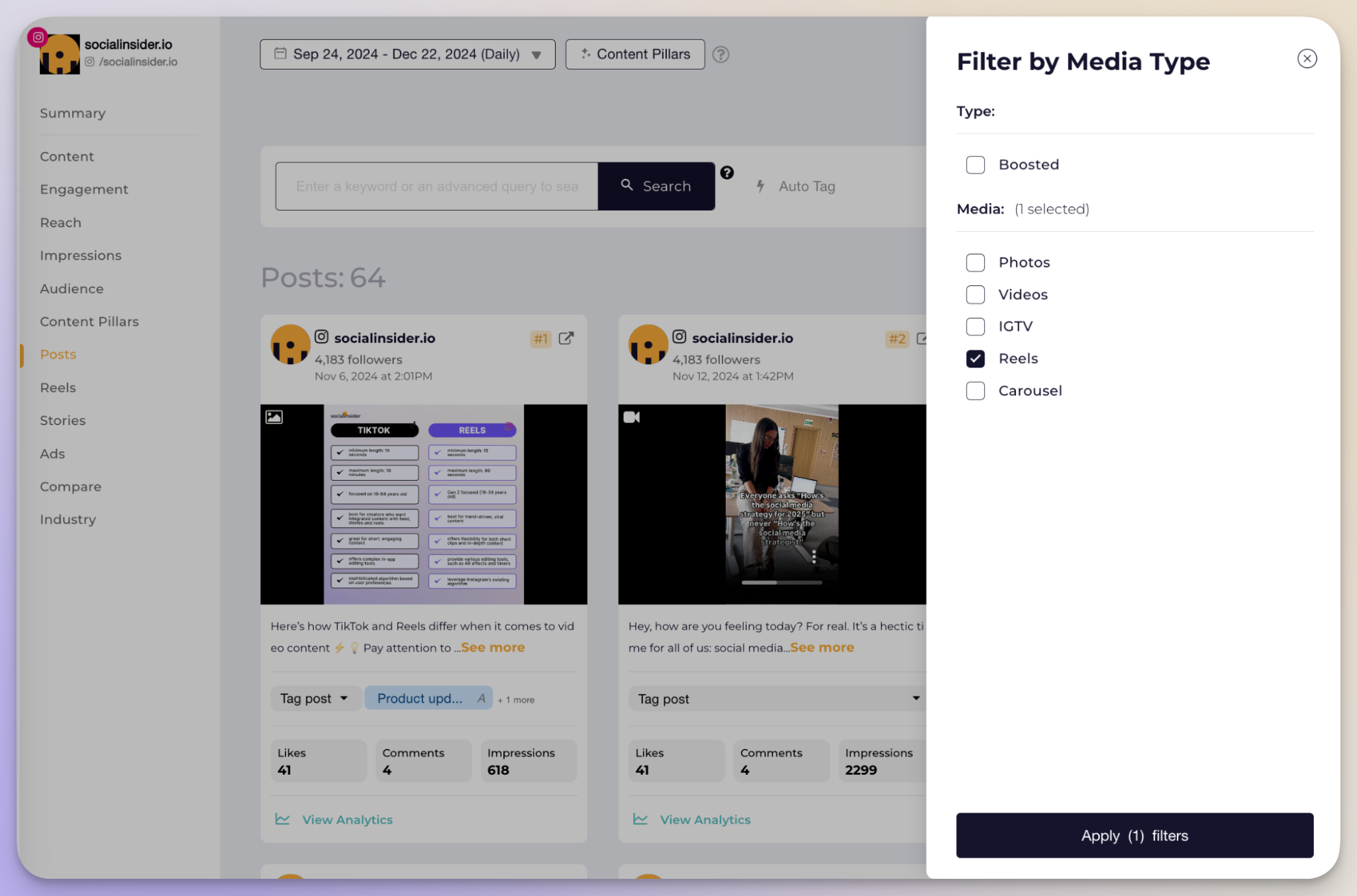
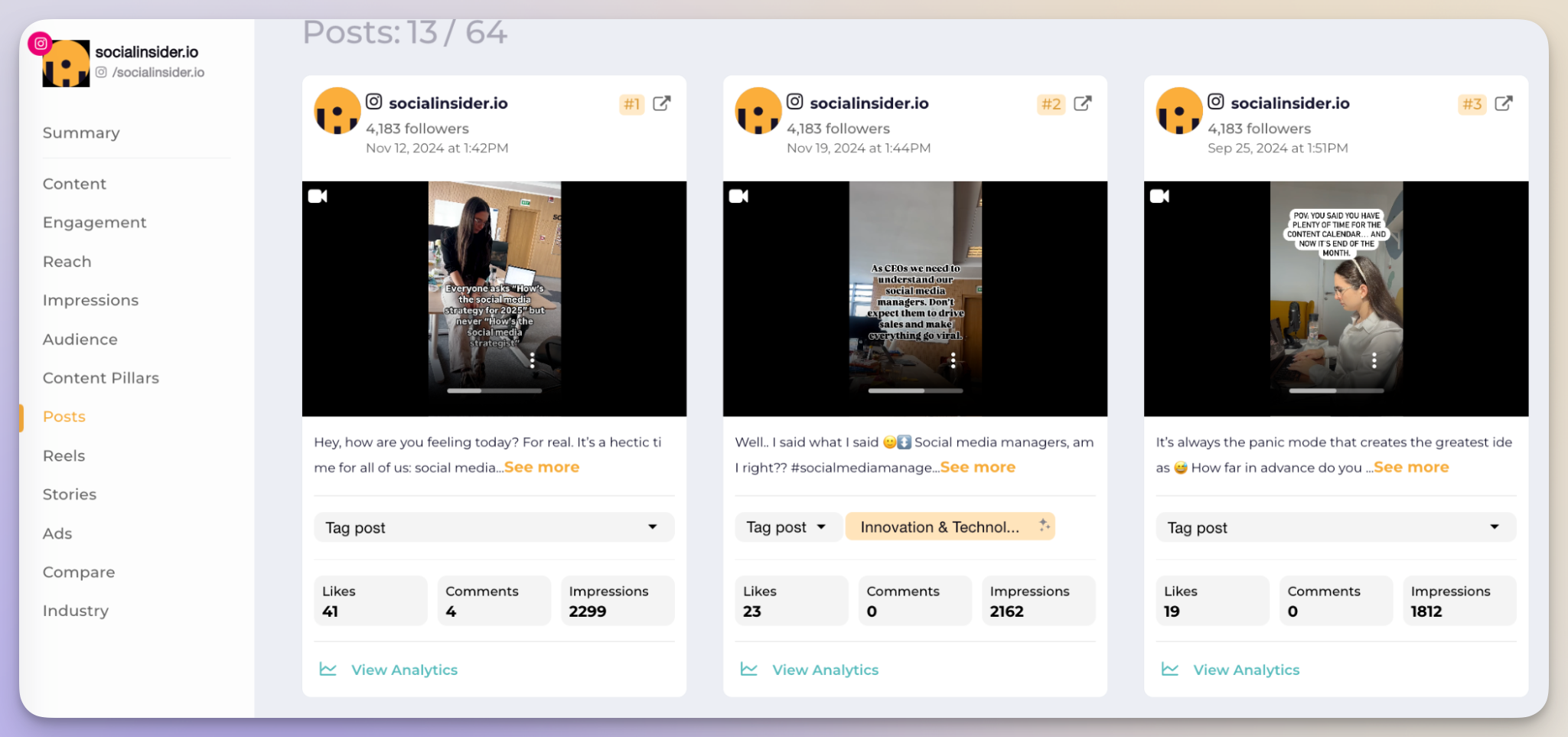
    socialinsider instagram reels analytics

    socialinsider top performing reels data

    When a team can see the top reels clearly, the next move gets easier. Miruna Vocheci, senior social media manager at Socialinsider, said, “Before Socialinsider, the hardest part was consolidating data from multiple platforms manually. I would lose a lot of time searching, then analyzing. The fact that I had to watch my competitors' performance without having a clue about the real numbers behind every post was also a major pain point. A lot of decisions were based on gut feeling rather than data.” That same logic applies to format choice: the more clearly you can see what works, the easier it becomes to decide whether a reel should stay a reel, become a story, or do both.

    Quick Decision Framework

    Choose a reel if the goal is discovery, longevity, or education. Choose a story if the goal is urgency, feedback, or daily relationship building. Choose both if the idea needs reach first and response second.

    Here is the fastest way to decide:

    • Choose a reel if the topic can help strangers understand the brand.
    • Choose a story if the topic should feel timely, personal, or temporary.
    • Choose a reel if the content can stay useful for weeks or months.
    • Choose a story if the content should disappear after the moment passes.
    • Choose both if one asset can work as a discovery layer and a follow-up layer.

    If your team is planning a broader content mix, the same logic applies to a post, story, and reel decision. A feed post usually works best for static reference content, a reel works best for discovery, and a story works best for interaction. The right format is the one that matches the job, not the one that feels most familiar.

    FAQ

    What Is An Instagram Reel Vs Story?

    An Instagram reel is a discoverable video format built for reach, saves, and longer shelf life. An Instagram story is a temporary, interactive format that disappears after 24 hours unless saved to highlights. Reels are better for education and visibility. Stories are better for feedback, updates, and quick action.

    Do Reels Get More Engagement Than Stories?

    Reels usually get broader engagement because the format reaches beyond followers and can keep circulating after publication. Stories usually create stronger immediate interaction from existing followers through replies, polls, link stickers, and taps. Socialinsider’s benchmarks show reels and stories should be judged differently because each format serves a different audience behavior.

    Should Brands Post Both Reels And Stories?

    Brands usually benefit from both formats. Reels help new people discover the brand, while stories help warm followers respond in real time. A simple workflow is to publish the reel first, then use stories to ask a question, share a reminder, or repost the strongest clip. That keeps production efficient without duplicating strategy.

    What Features Distinguish An Instagram Story From A Reel?

    A story includes polls, question stickers, emoji sliders, link stickers, and highlights, and it disappears after 24 hours unless saved. A reel supports longer video, remix-style collaboration, subtitles, audio choices, and discovery surfaces inside Instagram. Stories are more interactive and temporary. Reels are more searchable and evergreen.

    How Does Audience Interaction Differ Between Instagram Stories And Reels?

    Audience interaction in stories is usually immediate and low friction. Followers tap, vote, reply, or click a link while the content is still fresh. Audience interaction in reels is usually slower and broader. People like, comment, save, or share the reel after discovery. Stories create direct conversation. Reels create distributed reach.

    Final Thoughts

    If the goal is discovery, start with a reel. If the goal is interaction, start with a story. If the idea is strong enough to do both jobs, split the content so each format can do what it does best.

    That is the cleanest way to make format choice part of your social media strategy instead of an afterthought. If you want a faster read on which format is actually driving views, engagement, and reach, Socialinsider can help you compare your own performance without the manual spreadsheet work that slows teams down.

  • Articol de test editat

    Hootsuite Alternatives: 15 Tools Compared

    If your current social tool feels too expensive, too clunky, or too limited for the way your team works, a switch can save hours in reporting and reduce manual cleanup. This guide compares 15 tools so you can choose the one that fits your budget, channels, workflow, and analytics needs.

    The best choice is not always the biggest platform. For some teams, a lighter scheduler is enough; for others, deeper benchmarking, better support, or more flexible reporting is the difference between a useful stack and a frustrating one.

    Why Look For Hootsuite Alternatives?

    The short answer is that many teams compare Hootsuite alternatives because pricing, analytics depth, interface friction, platform coverage, and support quality usually determine whether a social media team stays or switches. The best Hootsuite alternatives solve one specific problem better than the original tool.

    Key Takeaways

    • Many teams move on when seat-based pricing rises faster than value.
    • Strong reporting matters most when leadership wants evidence, not just publishing outputs.
    • The best fit depends on your main job: scheduling, analytics, collaboration, visual planning, or client reporting.

    High Pricing, Especially For Teams

    According to Hootsuite's plans page, the public entry point starts at $99 per user per month, and the company also offers a 30 day free trial. That sounds manageable until the team grows.

    A five person team is already at $495 per month before upgrades, add-ons, or higher tiers enter the picture. For many managers, that cost stops feeling like a software subscription and starts feeling like a tax on collaboration.

    Hootsuite pricing options screenshot showing seat-based plan tiers and a 30 day free trial

    That pricing model is one reason people search for free Hootsuite alternatives or cheaper tools with clearer value. If a team only needs publishing and basic reporting, Hootsuite's seat-based structure can feel heavier than the job requires. For a small business or a lean agency, every seat has to justify itself.

    Lack Of In-depth Analytics

    When reporting needs move beyond surface numbers, social media analytics become the deciding factor. A tool has to show more than post counts and likes if leadership expects answers about growth, content mix, and competitor performance.

    Hootsuite benchmarking capability screenshot showing limited competitor comparison depth

    Socialinsider live data from June 2026 shows why platform-level analysis matters so much: TikTok average engagement rate is 20.98 percent, Instagram is 4.93 percent, and LinkedIn is 0.66 percent. Those differences are too large to treat as one blended benchmark.

    “You need some platform to analyze how we are doing and where we are at and what should we do to overcome or to follow our competitors,” said Aiden, Marketing Manager at LS Electric. That frustration shows up again and again in switch conversations.

    Clunky, Outdated Interface

    A busy interface slows down teams even when the feature list looks strong on paper. When publishing, approvals, and reporting all live in different corners of the product, every routine task takes more time than it should.

    In customer interviews, the manual work teams wanted to escape kept showing up in the same way: screenshots, Excel files, and reports assembled by hand. Chris, an employee at Axel Springer, said, “Socialinsider is great for us as it deals with LinkedIn which is fantastic. We can do a quick kind of import of the channels that we're looking at and then get a nice deck out that we can just immediately work with.”

    That kind of time saving matters because the person running social rarely has extra time to wrestle with a dashboard. A cleaner workflow is often the real upgrade.

    Feature Gaps And Platform Limitations

    Many teams do not switch because a platform is broken. They switch because a specific channel, workflow, or metric is missing when it matters most.

    For some teams, the pain is TikTok. For others, it is YouTube, Pinterest, content tagging, or deeper reporting on content performance. Customer research shows that the moment a tool misses LinkedIn, TikTok, or competitive benchmarking, the evaluation changes fast.

    Aiden needed LinkedIn analysis. Alfonso needed TikTok and YouTube support after Semrush fell short. Gabriel needed a way to stop relying on manual checks. That is why the best alternatives are not simply cheaper versions of the same thing; they solve a different operational problem.

    If your team needs competitor analysis, content categorization, or channel-specific reporting, a narrow publishing tool can become a bottleneck instead of a solution.

    Support And Reliability Concerns

    Support issues tend to become visible only when a campaign is already live, which is exactly why they matter. A delayed response, a broken connection, or a missed alert can turn a small issue into a reporting problem.

    In the broader social research, reliability came up as a recurring pain point. Teams wanted faster responses, fewer manual workarounds, and reports they could trust when a manager or board asked for proof.

    “We’ve also found social listening and being aware of what the online chatter and headlines are to be essential,” said Robbie Schneider, Director of US Communications at Health Tech Without Borders. That quote is about listening, but the same principle applies to support: the platform has to help teams react quickly when the environment changes.

    What A Modern Alternative To Hootsuite Should Offer?

    The best replacement should do more than publish posts. It should help you prove performance, reduce manual work, and make reporting easier for the rest of the business.

    A strong alternative usually has five things in common: transparent pricing, reliable scheduling, deeper reporting, stronger channel coverage, and support that does not disappear when a team needs help.

    What To Look For Before You Switch

    Need What To Look For Why It Matters
    Clear value Transparent pricing and a usable free plan or trial Helps teams test the platform without locking into a bad fit
    Better reporting Engagement rate, audience insights, and historical views Gives leadership a fuller picture than raw post counts
    Smarter benchmarking Competitive benchmarking and peer comparisons Makes social results easier to explain in context
    Better segmentation Audience analysis and tagging Helps teams connect content themes to performance
    Faster workflow Publishing, approvals, and inbox management in one place Saves time and reduces handoff mistakes
    Reliable support Fast help, onboarding, and stable integrations Keeps campaigns moving when something breaks

    Socialinsider live data from June 2026 shows why a one-size-fits-all dashboard is not enough. TikTok, Instagram, and LinkedIn behave very differently, so the platform you choose should let you separate each network instead of flattening them into one average.

    When It Makes Sense To Switch Versus Stay

    Switch if the current tool is costing time, obscuring performance, or forcing the team into workarounds. Stay if the current setup already supports your channels, your reporting is simple, and the team does not need deeper analysis.

    Switch If:

    • The team has grown and seat-based pricing is escalating.
    • Leadership wants stronger reporting and better benchmarking.
    • The current tool misses a channel that matters, such as TikTok or Pinterest.
    • Team members spend too much time stitching reports together.
    • Client or board reporting needs cleaner exports and branded views.

    Stay If:

    • The current workload is mostly solo publishing.
    • Analytics needs are basic.
    • The team is comfortable with the interface and support.
    • A free or very light tool already covers the essential channels.

    The fastest way to decide is to ask one question: does the current platform help the team explain performance, or just schedule posts? If the answer is the second one, the search for alternatives is already justified.

    How We Evaluated These Hootsuite Alternatives?

    The strongest Hootsuite competitors cluster around analytics, inbox management, visual planning, and budget-friendly scheduling. We looked at each tool the way a social media manager would use it in real life: can it publish consistently, can it report clearly, can the team adopt it without a headache, and does the price make sense for the value?

    That means the comparison is not based on feature checklists alone. It is based on the workflow a team has to run every week: planning, publishing, community management, reporting, and sharing results with leadership.

    Quick Comparison: Top Hootsuite Alternatives At A Glance

    Tool Best For Standout Strength Main Limitation Value Note
    Hootsuite Broad scheduling and team publishing Seat-based suite with wide platform coverage Pricing rises quickly as teams scale Good baseline, but not always the best value
    Socialinsider Analytics-led teams Competitor benchmarking, content pillars, and reporting Not a full publishing suite Strongest when reporting depth matters
    NapoleonCat Community management Inbox moderation and auto-replies No built-in social listening depth Good for high-volume engagement
    Vista Social All-in-one AI workflows Unified inbox, AI content help, and broad platform support Learning curve and add-ons Best for teams that want automation
    Sprout Social Enterprise reporting and listening Polished UI and advanced reports Premium pricing Strong for larger teams
    Agorapulse Agencies and inbox workflows Shared inbox, CRM sync, and approvals Listening is an add-on Strong client management fit
    Sendible Agencies and white-label delivery Bulk scheduling and white-label options Less depth in analytics Good for client-facing teams
    Later Visual planning Instagram and Pinterest-first workflow Lighter analytics Strong for creative teams
    Planoly Visual-first creators Pinterest and Instagram planning Collaboration is limited Best for small teams and creators
    Meta Business Suite Meta-native publishing Free native scheduling and insights Only covers Meta channels Best for Facebook and Instagram
    CoSchedule Cross-channel marketing calendars Content planning across social, blog, and email Can feel complex Good for teams centralizing workflow
    Semrush SEO-led content planning Keyword research plus social add-on Social is secondary Best for teams already in Semrush
    Buffer Simple, budget-friendly scheduling Free plan and clean interface Reporting is light Best for small teams and solo marketers
    SocialPilot Affordable team management Bulk uploads and client approvals Advanced analytics are limited Strong value for agencies and SMBs
    SocialBee Evergreen content automation Content categories and recycling Can feel more process-heavy Good for small teams with recurring content
    Zoho Social Zoho ecosystem users CRM and Desk integration Analytics are limited Best for existing Zoho customers

    Detailed Reviews: 15 Hootsuite Alternatives

    Analytics And Intelligence Powerhouses

    Socialinsider

    Verdict: Choose Socialinsider when reporting depth and competitive context matter more than simple publishing.

    Socialinsider is built for teams that need to explain performance, not just post content. It is especially useful when the real problem is benchmark quality, content categorization, or proving results to leadership.

    It is best for marketing teams, agencies, and social leads who need to compare their accounts against competitors, track content pillars, and pull stakeholder-ready reports.

    Here are the strengths that matter most:

    Socialinsider benchmarking feature screenshot showing side-by-side competitor performance and reporting depth

    Socialinsider industry benchmarks feature screenshot showing comparison against market averages

    Content tagging dashboard screenshot showing how Socialinsider groups posts by theme, format, and campaign

    Socialinsider live data also gives the platform a strong credibility edge. TikTok average engagement rate sits at 20.98 percent, Instagram at 4.93 percent, and LinkedIn at 0.66 percent, which is exactly the kind of spread that makes generic reporting hard to trust.

    “Socialinsider is great for us as it deals with LinkedIn which is fantastic. We can do a quick kind of import of the channels that we're looking at and then get a nice deck out that we can just immediately work with,” said Chris, an employee at Axel Springer.

    For teams that need to brief executives, the mix of benchmarking and historical trends keeps the conversation about business outcomes, not tool screenshots.

    Limitations: Socialinsider is not a full publishing suite, so teams that want one product for scheduling, inbox management, and deep analytics may still need a companion tool.

    Pricing and value note: Socialinsider sits in the analytics-first category, so it makes the most sense when reporting, benchmarking, and historical data have clear business value.

    NapoleonCat

    Verdict: Choose NapoleonCat when the inbox is the problem and moderation speed matters more than deep competitive analysis.

    NapoleonCat is a strong fit for teams that deal with a lot of comments, messages, and reviews. It brings publishing, moderation, reporting, and basic CRM-style organization into one place.

    It is best for support-heavy brands, agencies, and community teams that need to keep pace with incoming comments across multiple networks.

    Top strengths include:

    • A social inbox that aggregates comments, direct messages, reviews, and mentions from Facebook, Instagram, TikTok, LinkedIn, YouTube, and Google.
    • Auto-moderation rules that can hide spam, route messages, and trigger automated replies.
    • AI assistance that helps classify sentiment and speed up response workflows.
    • Reporting features that make it easier to send updates to stakeholders.
    • Contact history and internal notes for user management.

    NapoleonCat dashboard screenshot showing inbox moderation, automated replies, and workflow assignment

    NapoleonCat is especially useful when a team needs more than a basic inbox. The tradeoff is that social listening and deeper intelligence are not the main draw, so analytics-led teams may want a second platform for benchmarking.

    That makes it useful for brands with heavy community management or customer service hours, where response speed matters just as much as publication volume.

    Limitations: The product is less compelling if the main goal is competitor reporting or content-level intelligence.

    Pricing and value note: NapoleonCat usually sits in the mid-range, which makes it more affordable than premium enterprise suites but more specialized than lightweight schedulers.

    Vista Social

    Verdict: Choose Vista Social if you want a modern all-in-one platform with strong automation and broad channel coverage.

    Vista Social is built for teams that want AI-assisted workflows without stitching together too many separate tools. It covers publishing, engagement, reporting, and content help in one workspace.

    It is best for agencies, growing brands, and social teams that want a single dashboard for a lot of channels.

    Strengths worth noting:

    • AI content generation that can help with captions, ideas, and brand-consistent drafts.
    • A unified inbox that brings comments and messages into one view.
    • Smart scheduling that recommends posting times.
    • AI-driven reporting that adds interpretation to the numbers.
    • White-label reporting for agencies.

    Vista Social dashboard screenshot showing the all-in-one interface

    Vista Social unified dashboard screenshot showing inbox, scheduling, and reporting in one place

    Vista Social also stands out for channel breadth. Its inbox coverage can include Facebook, Instagram, X, LinkedIn, TikTok, YouTube, Pinterest, Google Business Profile, Bluesky, Threads, Reddit, and Snapchat, which makes it appealing to teams that manage a lot of active profiles.

    It can replace several point solutions when the team is willing to invest time in setup, because the payoff comes from reducing the number of places people need to check each day.

    Limitations: The platform can take time to learn, especially when automation is turned on for the first time. Some advanced features also sit behind add-ons.

    Pricing and value note: Vista Social is a good value when AI help and channel coverage matter more than a minimal interface.

    Sprout Social

    Verdict: Choose Sprout Social when premium reporting, listening, and team experience matter more than budget.

    Sprout Social is a polished option for teams that want a mature all-in-one platform with strong reporting and engagement tools. It is one of the most established Hootsuite competitors for larger teams.

    It is best for enterprise marketing teams, agencies, and organizations that need reliable reporting and a smoother day-to-day experience.

    Strengths include:

    • A modern interface that is easier to navigate than many enterprise tools.
    • Strong publishing and scheduling workflows.
    • A Smart Inbox for engagement management.
    • Custom reports that can be automated and branded.
    • Listening tools that extend beyond simple mentions.

    Sprout Social dashboard screenshot showing publishing, inbox, and reporting workflows

    Sprout Social listening feature screenshot showing topic and sentiment monitoring

    According to Sprout Social's own feature messaging, its listening layer reaches billions of data points. That scale is part of the appeal for teams that care about trend spotting and risk monitoring.

    The tradeoff is that teams pay for polish whether they use every advanced feature or not, and that makes the fit less obvious for smaller teams.

    Limitations: Sprout Social usually lands in the premium tier, so smaller teams can find the cost hard to justify. Some deeper capabilities also depend on add-ons.

    Pricing and value note: Sprout Social works best when reporting quality, support, and listening are worth the higher spend.

    Agorapulse

    Verdict: Choose Agorapulse if you need a strong inbox, client workflows, and clean team collaboration.

    Agorapulse is one of the best choices for agencies and brands that spend a lot of time inside the inbox. It combines publishing, engagement, and reporting in a way that keeps daily moderation manageable.

    It is best for agencies, social care teams, and multi-account managers.

    Its biggest strengths are:

    • A shared inbox for comments, mentions, and messages.
    • CRM integration that helps qualify social conversations.
    • Publishing and scheduling tools with collaborative workflows.
    • Monitoring and listening options for teams that need broader visibility.
    • Clean reporting for client updates.

    Agorapulse dashboard screenshot showing the shared inbox and publishing calendar

    Agorapulse listening dashboard screenshot showing keyword and mention monitoring

    Agorapulse is especially practical when a team wants to move quickly between publishing and engagement. The tradeoff is that listening is not always included in the base package, so the true cost can rise if social monitoring is part of the job.

    That practical orientation is why it performs well for agencies handling multiple stakeholders, because the workflow stays understandable even when the account mix becomes messy.

    Limitations: Advanced listening is an add-on, and X analytics support has become less central as platform access has changed.

    Pricing and value note: Agorapulse is a strong middle-ground option when client management matters more than raw analytics depth.

    Sendible

    Verdict: Choose Sendible if you run client-heavy workflows and want a tool built for agencies.

    Sendible is a practical agency platform for teams that need to keep multiple clients organized without building everything from scratch. It focuses on publishing, collaboration, and branded delivery.

    It is best for agencies, consultants, and small teams that need structured client management.

    Top strengths include:

    • Agency-friendly onboarding and secure client profile connections.
    • White-label options for branded reporting and client-facing views.
    • Bulk scheduling and a shared content calendar.
    • UTM tagging for easier campaign tracking.
    • Collaboration tools that support approvals and handoffs.

    Sendible dashboard screenshot showing the agency calendar and client management workspace

    Sendible is especially useful when the team wants a clean client workflow and does not want to fight the software every day. If a team also needs to create social content, Sendible can sit beside a planning stack without getting in the way.

    The tool is not as analytics-heavy as some alternatives, but it does a solid job of simplifying delivery.

    Limitations: Sendible is less compelling if advanced benchmarking or deep listening are the main goals. Pinterest support is also a gap that matters for some brands.

    Pricing and value note: Sendible is a credible lower-cost agency option when white-label delivery matters more than enterprise complexity.

    Visual Content And Creative-First Tools

    Later

    Verdict: Choose Later if visual planning, Instagram, and Pinterest sit at the center of the strategy.

    Later is one of the clearest visual-first alternatives to Hootsuite. It is designed for teams that think in grids, previews, and creative calendars instead of dense reporting screens.

    It is best for creators, small brands, and visual teams that need a simple planning workflow.

    Strengths include:

    • A visual content calendar that makes planning easy.
    • Instagram-first features such as story scheduling and product tagging.
    • UGC collection and organization.
    • Link-in-bio tools for driving traffic.
    • Support across Facebook, Instagram, Pinterest, TikTok, YouTube, and X.

    Later visual calendar dashboard screenshot showing drag-and-drop planning and post previews

    Later is a strong choice when the team wants to see the feed before it goes live. That visual clarity helps with planning, but it also means analytics depth is not the product’s strongest selling point.

    If the creative team wants to preview campaign rhythm before the month starts, Later is comfortable and intuitive.

    Limitations: Reporting is lighter than in analytics-first platforms, and collaboration features are better suited to smaller teams than large organizations.

    Pricing and value note: Later is a good fit when Instagram and Pinterest deserve special treatment, not just generic scheduling.

    Planoly

    Verdict: Choose Planoly when Instagram and Pinterest planning need to stay simple and visual.

    Planoly is a focused visual planner for small teams, creators, and brands that care more about aesthetics and consistency than complex reporting.

    It is best for solo marketers, creators, and small businesses that prioritize visual control.

    Top strengths:

    • Drag-and-drop planning for Instagram and Pinterest.
    • Auto-publishing for select post types.
    • A grid-first interface that helps with aesthetic planning.
    • Shopify integration for social commerce workflows.
    • Basic analytics for post and profile review.

    Planoly dashboard screenshot showing visual planning and content organization

    Planoly works well when the team needs a calmer, more visual version of a scheduler. The tradeoff is that team collaboration and deeper reporting are limited, so larger groups may outgrow it quickly.

    That makes it a good fit for small shops with a high visual standard, especially when Pinterest and Instagram are the most important channels.

    Limitations: Planoly does not offer the same collaborative depth as larger all-in-one platforms, and manual steps can still show up for some content types.

    Pricing and value note: Planoly is a smart option for smaller visual teams that want control without enterprise overhead.

    Meta Business Suite

    Verdict: Choose Meta Business Suite if your world is mostly Facebook, Instagram, and WhatsApp Business, and the budget is tight.

    Meta Business Suite is the most obvious free option for teams already focused on Meta channels. It is not a full replacement for every social use case, but it can cover the basics surprisingly well.

    It is best for businesses that live inside the Meta ecosystem and need a native tool.

    Strengths include:

    • Free access for Facebook, Instagram, and WhatsApp Business management.
    • Native scheduling and cross-posting.
    • Audience and performance insights.
    • Direct integration with Meta features and ad workflows.
    • A familiar interface for teams already working inside Meta tools.

    Meta Business Suite insights screenshot showing native audience analytics and scheduling

    The limitation is simple: Meta Business Suite only covers three properties, so any broader social strategy needs another platform. Its analytics are also more limited than dedicated reporting tools, with many metrics focused on the last 28 days.

    Because it is native, setup friction is low, but leaders should be realistic about the reporting ceiling.

    Limitations: No broad multi-network management, limited history, and little flexibility for non-Meta workflows.

    Pricing and value note: Meta Business Suite is the easiest free starting point for Meta-first teams, but not a full Hootsuite replacement.

    Marketing Workflow And Automation

    CoSchedule

    Verdict: Choose CoSchedule if you want social planning connected to the rest of the marketing calendar.

    CoSchedule is best for teams that want social posts, blog content, and campaign work to live in one planning system. It is less about deep analytics and more about keeping the whole team aligned.

    It is best for marketing teams that manage campaigns across channels and content types.

    Strengths include:

    • A unified calendar for social, blog, and email work.
    • Asset management for files and campaign materials.
    • Team collaboration and project organization.
    • ReQueue-style content promotion for recurring posts.
    • A workflow structure that centralizes planning.

    CoSchedule dashboard screenshot showing the marketing calendar and asset organization

    The tool can be powerful when the team needs structure, but the structure can feel heavy if the only real need is scheduling. That is why CoSchedule works best for teams with a broader content workflow, not just social publishing.

    It helps when the team thinks in campaigns rather than isolated posts, which is why it fits marketing managers who oversee multiple content types.

    Limitations: The system can feel complex, and some useful features depend on add-ons or higher plans.

    Pricing and value note: CoSchedule is strongest when a social team also owns editorial planning and campaign delivery.

    Semrush

    Verdict: Choose Semrush if social media planning is part of a broader SEO and content strategy.

    Semrush is not a dedicated social management suite, but its social add-on can be useful when content planning, keyword research, and competitive research all live in the same workflow.

    It is best for content teams, SEO teams, and marketers who already use Semrush for search strategy.

    Strengths include:

    • Keyword and topic research that supports social planning.
    • Audience and competitor insight across marketing channels.
    • A social calendar for supported networks.
    • Useful overlap with SEO-led editorial planning.
    • Competitive research that ties social ideas to search demand.

    Semrush social tool dashboard screenshot showing social scheduling and planning

    Semrush can be a smart bridge between search and social, but the social module is secondary to the core platform. If the team needs deep social reporting or channel-by-channel benchmarking, a dedicated tool will usually do more.

    If social is only one part of the content engine, Semrush can keep planning close to SEO, which is often useful for lean teams that want one research hub.

    Limitations: Social is an add-on rather than the core offer, and some major social channels are outside the supported set.

    Pricing and value note: Semrush makes sense when one subscription already anchors the team’s SEO and content work.

    Budget-Friendly And Startup Solutions

    Buffer

    Verdict: Choose Buffer when you want the simplest low-cost path to scheduling and basic analytics.

    Buffer is one of the best-known free Hootsuite alternatives for teams that care about ease more than breadth. It keeps the interface clean and the learning curve short.

    It is best for solo marketers, small businesses, and lean teams.

    Strengths include:

    • A free plan for light scheduling.
    • Simple publishing tools with custom posting times.
    • Basic analytics that help teams spot patterns.
    • A clean interface that is easy to adopt quickly.
    • A clear path from solo use to team use.

    Buffer's pricing page still emphasizes a free plan and a paid toolkit, which makes the product attractive for teams that want to test before they commit. The budget story is clear: lower complexity, lower barrier to entry, and less time spent learning a bloated interface.

    That is why Buffer often becomes the first stop for teams looking for cheaper alternatives to Hootsuite without a long onboarding cycle.

    Limitations: Reporting is lighter than premium platforms, and some users still report publishing issues or Instagram scheduling friction.

    Pricing and value note: Buffer is often the first tool teams try when they want cheaper alternatives to Hootsuite without a steep onboarding curve.

    SocialPilot

    Verdict: Choose SocialPilot if you want a lower-cost team tool with bulk scheduling and client approval workflows.

    SocialPilot is built for cost-conscious teams that still need multi-platform scheduling and client-friendly processes. It is one of the stronger Hootsuite alternatives for small agencies and growing teams.

    It is best for agencies, small businesses, and client-heavy teams.

    Strengths include:

    • Bulk CSV scheduling for faster planning.
    • White-label reports and dashboards.
    • Client approval workflows and branded logins.
    • Support for Facebook, Instagram, TikTok, LinkedIn, YouTube, and Pinterest.
    • A value-oriented pricing structure that stays more accessible than premium enterprise suites.

    SocialPilot dashboard screenshot showing bulk scheduling and client workflow management

    SocialPilot is particularly appealing when a team wants practical features without an enterprise contract. It is less about deep analytics and more about helping teams publish, approve, and deliver at scale.

    That balance makes it attractive for agencies that want enough structure to scale without enterprise overhead.

    Limitations: Advanced analytics and some collaboration features are more limited than in higher-tier tools.

    Pricing and value note: SocialPilot is a strong fit for small businesses that need value and structure.

    SocialBee

    Verdict: Choose SocialBee if evergreen content and category-based scheduling are the real pain points.

    SocialBee is useful for teams that publish recurring content and need a way to keep evergreen posts alive without manual repetition.

    It is best for small businesses, content-heavy teams, and marketers with recurring themes.

    Strengths include:

    • Content categories that organize the calendar.
    • Evergreen recycling for high-performing posts.
    • RSS feed integration for automated content pulls.
    • A unified place for posting and engagement.
    • A system that helps teams keep a steady cadence.

    SocialBee dashboard screenshot showing content categories and evergreen scheduling

    SocialBee works well when the goal is consistency and efficiency. The category structure can feel a little process-heavy at first, but it becomes helpful once the team has recurring content types to manage.

    The category model also helps teams map content to recurring themes and avoid random posting, which makes planning feel more deliberate.

    Limitations: The workflow can feel rigid for teams that prefer a more open planning model, and some users report occasional glitches.

    Pricing and value note: SocialBee is a good budget-friendly option when the content plan is built around repeatable themes and recycling.

    Specialized And Niche Solutions

    Zoho Social

    Verdict: Choose Zoho Social when the rest of the Zoho ecosystem already powers the team.

    Zoho Social makes the most sense for organizations that already use Zoho CRM, Zoho Desk, or other Zoho products. It is a good example of how a specialized tool can beat a generalist platform when ecosystem fit matters.

    It is best for existing Zoho users, support teams, and lead-focused marketers.

    Strengths include:

    • Native Zoho CRM and Zoho Desk integration.
    • Internal notes and task assignment for team collaboration.
    • Monitoring dashboards for keywords, mentions, reviews, and hashtags.
    • A clear connection between social activity and lead management.
    • A lighter, more focused operational flow.

    Zoho Social dashboard screenshot showing publishing, monitoring, and team workflow tools

    Zoho Social is useful when the business wants social data to flow into a broader customer workflow. The main tradeoff is that analytics depth is limited when compared with the more dedicated benchmarking platforms.

    That integration can save time when social data has to trigger follow-up sales or support tasks, which is why the tool remains a practical choice inside the Zoho stack.

    Limitations: Advanced benchmarking, sentiment depth, and broader reporting flexibility are not the main strengths.

    Pricing and value note: Zoho Social is strongest when the team already lives in Zoho and wants the social stack to stay inside the same ecosystem.

    Head-to-Head Comparisons

    Hootsuite Vs Top 5 Alternatives

    The fastest way to choose is to compare the job, not the logo. Socialinsider wins on analytics, Buffer wins on simplicity, Agorapulse wins on inbox workflow, Later wins on visual planning, and Sprout Social wins on premium reporting and listening.

    Need Better Fit Why
    Analytics and benchmarking Socialinsider Stronger competitor context, content pillars, and reporting
    Simple scheduling Buffer Cleaner interface and lower-cost entry point
    Agency inbox work Agorapulse Shared inbox and client collaboration
    Visual content planning Later Stronger visual calendar and Instagram or Pinterest focus
    Premium reporting Sprout Social Better reporting depth and listening features

    Hootsuite still has a place when a team wants broad management and already accepts seat-based pricing. But for most evaluation teams, one of these five options solves the real pain point more cleanly.

    Hootsuite Vs Sprout Social

    Sprout Social is the better choice when reporting polish, listening, and support matter more than a low entry price. Hootsuite can still work, but Sprout usually feels more refined for teams that live in dashboards every day.

    Feature Sprout Social Hootsuite
    Reporting Deep and customizable More basic unless upgraded
    Listening Stronger and more central Often tied to higher tiers
    User experience Cleaner and more modern Can feel busier
    Support perception Stronger More mixed

    According to Sprout Social's own messaging, its listening layer reaches billions of data points, which is useful for teams that monitor trends or reputation closely. Hootsuite's public plans, by contrast, start at $99 per user per month, so the comparison is really about how much depth justifies the spend.

    Choose Sprout Social if: The team needs better reporting, stronger listening, and a polished interface.

    Choose Hootsuite if: Broad social management matters more than reporting depth.

    Hootsuite Vs Buffer

    Buffer is the easier and cheaper choice for teams that do not need heavyweight reporting. Hootsuite becomes more attractive only when a team needs broader enterprise management or more structured collaboration.

    Feature Buffer Hootsuite
    Entry cost Free plan and lower-cost tiers Seat-based plans starting at $99 per user per month
    Ease of use Very simple More complex
    Analytics Basic More developed than Buffer
    Team workflows Lightweight More robust

    Buffer's appeal is straightforward: a free plan, clean scheduling, and a short learning curve. Hootsuite's appeal is breadth, but that breadth comes with more friction and a higher price floor.

    Choose Buffer if: Simplicity and affordability matter most.

    Choose Hootsuite if: A larger team needs more structured management and can justify the cost.

    Hootsuite Vs Agorapulse

    Agorapulse is the better fit for agencies and teams that spend a lot of time in the inbox. Hootsuite is broader, but Agorapulse often feels more practical for daily engagement and client work.

    Feature Agorapulse Hootsuite
    Inbox management Strong shared inbox More general-purpose streams
    CRM-style workflows Better built in Less central
    Listening Add-on based Varies by plan
    Client collaboration Strong Available, but less focused

    Agorapulse supports the main social channels agencies need, and its CRM integration makes it easier to connect social work with client relationships. Hootsuite is still viable for broad coverage, but Agorapulse is more focused on daily execution.

    Choose Agorapulse if: Client management, moderation, and engagement speed matter most.

    Choose Hootsuite if: The team wants broader platform management in a more general suite.

    Hootsuite Vs Later

    Later is the stronger choice when the social strategy is highly visual. Hootsuite is more general, but Later makes planning Instagram and Pinterest content much easier.

    Feature Later Hootsuite
    Visual planning Strong drag-and-drop calendar More traditional dashboard
    Instagram and Pinterest Especially strong Supported, but less specialized
    UGC tools Built in Limited
    Analytics Lighter Broader, but less visual

    Later supports Facebook, Instagram, Pinterest, TikTok, YouTube, and X, but its real advantage is how easily teams can see a visual plan before the content goes live. If creative consistency is the main issue, Later usually wins.

    Choose Later if: Visual planning and Instagram-first workflows matter most.

    Choose Hootsuite if: The team needs broader management across many profiles and formats.

    Specialized Comparisons

    Best For Analytics And Competitive Intelligence

    The best fit here is Socialinsider. Analytics-led teams need competitor context, content pillars, historical patterns, and reports that leadership can understand quickly.

    Socialinsider makes sense when a team is trying to answer questions like: What changed? Which competitor is outperforming us? Which content themes are working? What needs to change next quarter?

    That matters because platform performance varies so much. Socialinsider live data shows TikTok at 20.98 percent average engagement rate, Instagram at 4.93 percent, and LinkedIn at 0.66 percent. A reporting tool that flattens that difference into one dashboard is not giving the team enough context.

    Best For Visual Content Management

    Later is the strongest pure visual planner, with Planoly as a strong secondary choice. Both tools are easier to use when the work starts with the feed or the grid, not a report.

    Later is the better pick for teams that need a more flexible platform mix. Planoly is better when Pinterest and Instagram are the core channels. That distinction matters because creative teams usually want to see the final look before they approve the schedule.

    Best For Agencies And Client Management

    Agorapulse, Sendible, and SocialPilot are the strongest options here, but each solves a slightly different problem.

    • Agorapulse is best when inbox work and client communication dominate the day.
    • Sendible is best when white-label delivery and agency workflow matter.
    • SocialPilot is best when budget pressure sits alongside client approvals and bulk scheduling.

    If the team is a one-person shop or a small agency, SocialPilot often offers the most balanced mix of value and function.

    Best For Content Automation

    SocialBee and CoSchedule stand out here, but they automate different parts of the workflow.

    SocialBee is the better fit for evergreen recycling and category-based publishing. CoSchedule is the better fit when social planning sits inside a broader marketing calendar with blogs and email. In other words, SocialBee automates what gets posted, while CoSchedule automates how the calendar stays organized.

    Best For Budget-Conscious Businesses

    Buffer, Meta Business Suite, and SocialPilot are the names to look at first.

    Buffer is the easiest entry point because of the free plan and simple interface. Meta Business Suite is free for Meta channels and works well for Facebook and Instagram teams. SocialPilot is the best value when a small team still needs client workflows and multi-platform publishing.

    Dash Social's 2025 benchmark report adds an important reminder here: shares were up 31 percent on TikTok and 86 percent on Instagram. That kind of format momentum is why a budget tool still needs to support the metrics that matter, not just the cheapest posting flow.

    Best All-in-One Alternatives

    Vista Social, Sprout Social, and NapoleonCat are the strongest all-in-one options. Each one covers publishing, engagement, and reporting, but with a different emphasis.

    • Vista Social leans into AI and automation.
    • Sprout Social leans into premium reporting and support.
    • NapoleonCat leans into moderation and inbox control.

    If the team wants one tool to do nearly everything, Vista Social is often the most flexible starting point. If the team wants the most refined experience, Sprout Social usually feels stronger. If the team cares about moderation, NapoleonCat has the edge.

    Decision Framework Summary

    The right choice becomes obvious when the team starts with the job to be done instead of the brand name. Choose the tool that fixes the biggest friction point first.

    If the problem is analytics, benchmarking, or board reporting, choose Socialinsider. If the problem is simple, affordable scheduling, choose Buffer or Meta Business Suite. If the problem is agency workflow, choose Agorapulse, Sendible, or SocialPilot. If the problem is visual planning, choose Later or Planoly. If the problem is broad workflow management, choose Vista Social or Sprout Social.

    The point is not to buy the most complete tool. The point is to buy the tool that removes the most friction from the team’s week.

    Choose Socialinsider If

    Choose Socialinsider if leadership expects clearer reporting, competitors matter to the strategy, and the team needs to explain performance in a way that is easy to defend. Socialinsider is also the better fit if social media analysis needs to cover historical trends, content pillars, and social media roi instead of only publishing volume. It is the strongest choice when the goal is to answer questions with evidence instead of instinct.

    Choose Buffer If

    Choose Buffer if the team wants a lower-cost, low-friction scheduler with a free plan and a gentle learning curve. Buffer is especially useful for small businesses and solo marketers that do not need deep analytics or complex approval workflows. It is also a practical starting point for teams that want to test a simpler process before they invest in a larger stack.

    Choose Agorapulse If

    Choose Agorapulse if inbox management, client approvals, and moderation are central to the job. Agorapulse is the better fit when social teams spend more time responding and routing messages than they do producing long reports. It is also a solid choice for agencies that want to keep the workflow readable for multiple clients.

    Choose Later If

    Choose Later if Instagram and Pinterest drive the content strategy and the team benefits from seeing a visual calendar before publishing. Later is also a smart option when UGC and link-in-bio management are part of the daily workflow. If the creative team wants to protect the feed aesthetic, Later often makes that job easier.

    Migration Guide: Switching From Hootsuite

    Switching is easier when the team treats migration like a project, not a side task. The cleanest rollouts usually follow five steps.

    1. Audit every social account, integration, and scheduled post.
    2. Export the reports, media, and post history that leadership still needs.
    3. Map each workflow in the new tool before the old one is shut off.
    4. Train the team on publishing, approvals, reporting, and inbox handling.
    5. Run both systems in parallel for a short period, then cut over once the team is confident.

    That last step is where a lot of teams win back time. Chris at Axel Springer described the value of a quick import and a deck that the team could work with immediately, which is a good model for any migration: the new tool should reduce friction from day one.

    Advanced Features Breakdown

    Once a team moves beyond simple scheduling, the shortlist should include a few extra checks.

    • AI and automation: Helpful if repetitive writing or tagging slows the team down.
    • Advanced analytics and reporting: Essential if stakeholders want more than likes and post counts.
    • Social listening: Useful when brand safety, reputation, or trend monitoring is part of the brief.
    • White-label delivery: Important for agencies that need client-ready reports.
    • API access and integrations: Necessary when social data has to flow into dashboards or internal systems.

    If those capabilities matter, a tool should be judged on workflow fit, not just feature count.

    Customer Support And Training Comparison

    Support quality matters because social media work is time-sensitive. A fast interface is useful, but a fast answer from support can save a campaign.

    The best support setups usually combine live help, good onboarding, and documentation that actually teaches the team how to work faster.

    • Look for live chat or fast email response times.
    • Check whether onboarding is guided or self-serve.
    • Confirm whether reports, training, and templates are easy to find.
    • Ask whether the team can access a knowledge base or community forum.
    • Test how quickly the vendor answers a real question during the trial.

    “We’ve also found social listening and being aware of what the online chatter and headlines are to be essential,” said Robbie Schneider, Director of US Communications at Health Tech Without Borders. That same urgency is why support matters: when the environment changes, the tool has to keep up.

    Bonus Resources

    The fastest way to choose the right tool is to audit what the team already does manually. A smart switch starts with a baseline, not a guess.

    Profile Optimization Audit

    • Check whether each profile is complete and up to date.
    • Review profile naming, bios, and links.
    • Confirm branding consistency across channels.
    • Verify tracking links and campaign UTM settings.
    • Make sure the setup matches the current content strategy.

    Content Performance Analysis

    • Review the best-performing content types.
    • Compare engagement rate by format.
    • Identify which content pillars drive the most return.
    • Compare results across platforms before making changes.
    • Note which posts helped reach or save the most time.

    Audience Insights Review

    • Review demographic trends and audience shifts.
    • Check whether follower growth matches campaign themes.
    • Compare audience quality across channels.
    • Look at comments and saves for stronger intent signals.
    • Use audience analysis to match content to audience behavior.

    Technical Setup Assessment

    • Review integrations with CRM, dashboards, and reporting tools.
    • Confirm data export and backup routines.
    • Check whether reports can be shared internally without manual cleanup.
    • Make sure the team can keep historical data if the current tool changes.
    • Verify that the tech stack supports the social media analysis workflow.

    Migration Timeline Template

    • Week 1: Audit accounts, content libraries, and integrations.
    • Week 2: Export data and prepare internal workflows.
    • Week 3: Configure the new tool and assign roles.
    • Week 4: Train the team and test core workflows.
    • Week 5: Run a parallel workflow and compare outputs.
    • Week 6: Fully switch once reporting and publishing are stable.

    Success Metrics Framework

    A tool switch succeeds when the team saves time, reporting gets clearer, and leadership sees better answers faster. The right metrics make that obvious.

    Technical Success Metrics

    • All scheduled posts publish on time.
    • Integrations stay connected.
    • Reports pull the right data without manual correction.
    • Historical charts remain continuous across the switch.
    • The team can track the channels that matter most.

    Adoption Success Metrics

    • The team uses the new platform consistently.
    • Training completion reaches the full group.
    • Reporting turnaround becomes faster.
    • Approvals and inbox workflows actually get used.
    • Fewer manual exports are needed each week.

    Business Impact Metrics

    • Social media metrics improve or become easier to explain.
    • Benchmark comparisons are more credible.
    • Stakeholders ask fewer follow-up questions about reporting.
    • The team can connect social output to business goals more clearly.
    • Social media roi becomes easier to defend in meetings.

    If TikTok is averaging 20.98 percent engagement and LinkedIn is averaging 0.66 percent, according to Socialinsider live data, the success metric is not just more activity. It is better judgment about where to invest time.

    FAQs About Hootsuite Alternatives

    Is It Worth Switching From Hootsuite?

    Switching is worth it when pricing, reporting depth, or platform coverage no longer match the team’s needs. The strongest reasons are usually analytics gaps, clunky workflows, or a channel that matters but does not get enough support. Hootsuite still fits some teams, but the market now offers stronger value for specific jobs.

    What Are The Best Free Hootsuite Alternatives?

    The best free Hootsuite alternatives usually start with Buffer's free plan and Meta Business Suite for Facebook and Instagram. Pinterest teams should also look at Pinterest's native scheduler before adding a paid tool. Free options usually cover only the basics, so the right choice depends on whether scheduling, reporting, or collaboration matters most.

    How Long Does Migration Typically Take?

    A simple migration can take one to two weeks, while a broader agency or enterprise rollout can take several weeks longer. The timeline depends on how many accounts, approvals, integrations, and historical reports need to move. A short overlap period usually makes the switch safer because the team can compare outputs before turning off the old setup.

    What Features Should I Never Compromise On?

    The non-negotiables are platform coverage, reporting reliability, support responsiveness, and the ability to share results clearly with leadership. If the team cares about engagement rate, competitor analysis, or social media metrics, those views need to be easy to access and easy to trust.

    Are There Free Tools Similar To Hootsuite For Pinterest Scheduling?

    Free third-party options are limited for Pinterest, so the best starting point is usually Pinterest's native scheduler or a free plan from a lightweight tool like Buffer. Planoly and Later are better when Pinterest becomes a real planning channel, but those platforms are more useful once a team is ready to pay for visual workflow and better organization.

    How Do I Convince My Team Or Boss To Switch?

    The easiest business case is built around time saved, reporting quality, and risk reduction. Show how much manual work the current tool creates, how hard it is to explain performance, and how much easier the new platform makes stakeholder reporting. One concrete benchmark or client-ready report often does more than a feature list ever will.

    Can I Use Multiple Tools Together?

    Yes. Many teams pair an analytics-first platform with a lighter scheduler or a visual planning tool. Socialinsider plus Buffer is a common pattern for teams that want benchmarking and simple publishing. Socialinsider plus Later works well when analytics and visual planning both matter. The best stack is often a combination, not a single all-in-one product.

    Final Thoughts

    The best Hootsuite alternative is the one that removes the biggest source of friction in your workflow. If reporting and benchmarking matter most, Socialinsider is the strongest fit. If simplicity and cost matter more, Buffer, Meta Business Suite, SocialPilot, or Later may be the smarter first step.

    The broader lesson is simple: do not choose a platform just because it has a long feature list. Choose the one that helps the team explain results, save time, and keep leadership confident in the numbers.

    If the current stack still forces manual exports, screenshots, or guesswork, a switch can create real relief. And if the next question is how to turn that relief into better decisions, start with social media roi: what saves time, what improves confidence, and what makes the next report easier to defend.

  • Hello world!

    Welcome to WordPress. This is your first post. Edit or delete it, then start writing!